The paused update that wanted 44.78 GB
I paused a Fortnite update overnight, and the Epic Games Launcher decided to download the whole game again. Here is what was really going on, and the small tool I built to fix it.
I paused a Fortnite update at night and closed the launcher. In the morning, the Epic Games Launcher wanted to download the whole game again: 44.78 GB. And the Verify button, the one that’s supposed to check your files, was greyed out.
Every single file was still on my disk. So what happened?
What the launcher was really doing
The launcher keeps a small record for every game, a JSON file with a .item extension. When I paused the update, it moved the game’s record into a Pending folder and set one field:
"bIsIncompleteInstall": trueFrom then on, it treated the update like a fresh install. Fresh installs don’t verify, they download everything. That’s where the 44.78 GB came from.
The files were fine. The launcher’s bookkeeping was what got stuck.
The fix, by hand
Once I understood that, the fix was surprisingly small:
- Close the launcher completely (otherwise it undoes your changes).
- Back up the game’s records and file lists.
- Swap in the new version’s file list (
.manifest). - Change that one word,
true→false. - Move the records out of
Pending. - Open the launcher and press Verify.
Verify then checks the files you already have and downloads only what changed. On my hard drive, it finished in about 35 minutes, and the launcher’s own log confirmed it: IncompleteInstall=0.
Turning it into a tool
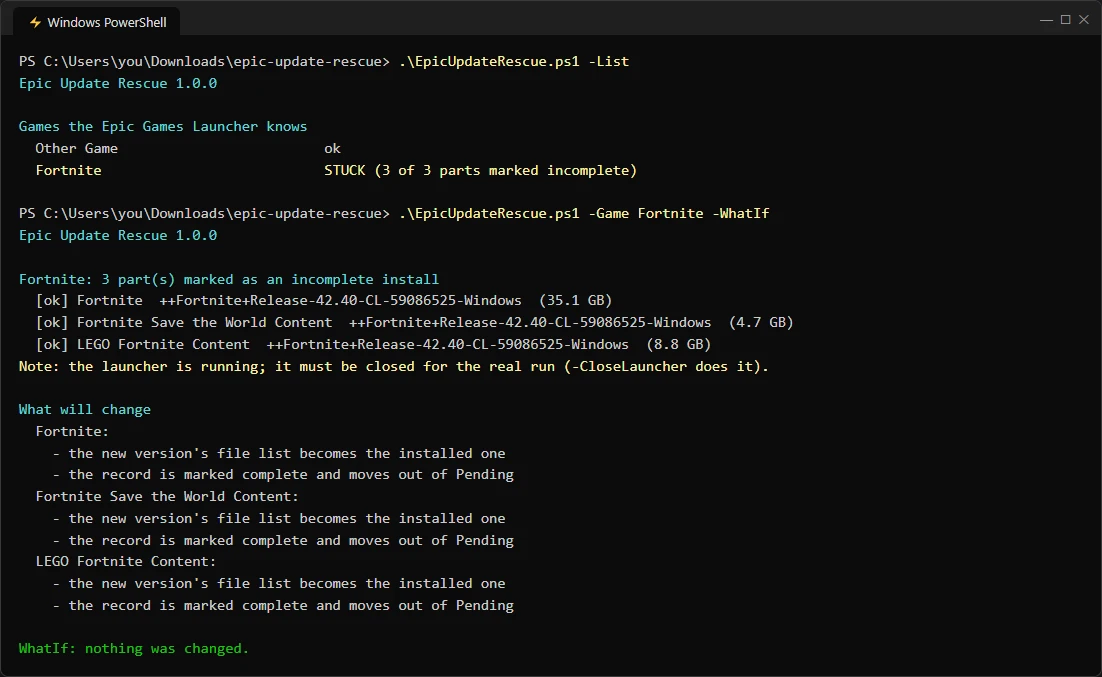
I did it by hand twice. The third time, I wrote it down as a script, Epic Update Rescue, so anyone can do it safely:
.\EpicUpdateRescue.ps1 -List                     # which games are stuck
.\EpicUpdateRescue.ps1 -Game Fortnite -WhatIf    # show the plan, change nothing
.\EpicUpdateRescue.ps1 -Game Fortnite -CloseLauncher
The interesting part wasn’t the fix itself, it was making it safe:
- Games come in parts. Fortnite has three: the game, Save the World and LEGO Fortnite. Fix only one and the launcher still thinks the game is broken.
- Backup first, always. Every file it touches is copied and checked byte for byte, with a
restore.json, so-Undoputs everything back exactly. - Refuse rather than guess. If the launcher is open, if a file list is missing, or if anything fails halfway, it stops and restores the backup on its own.
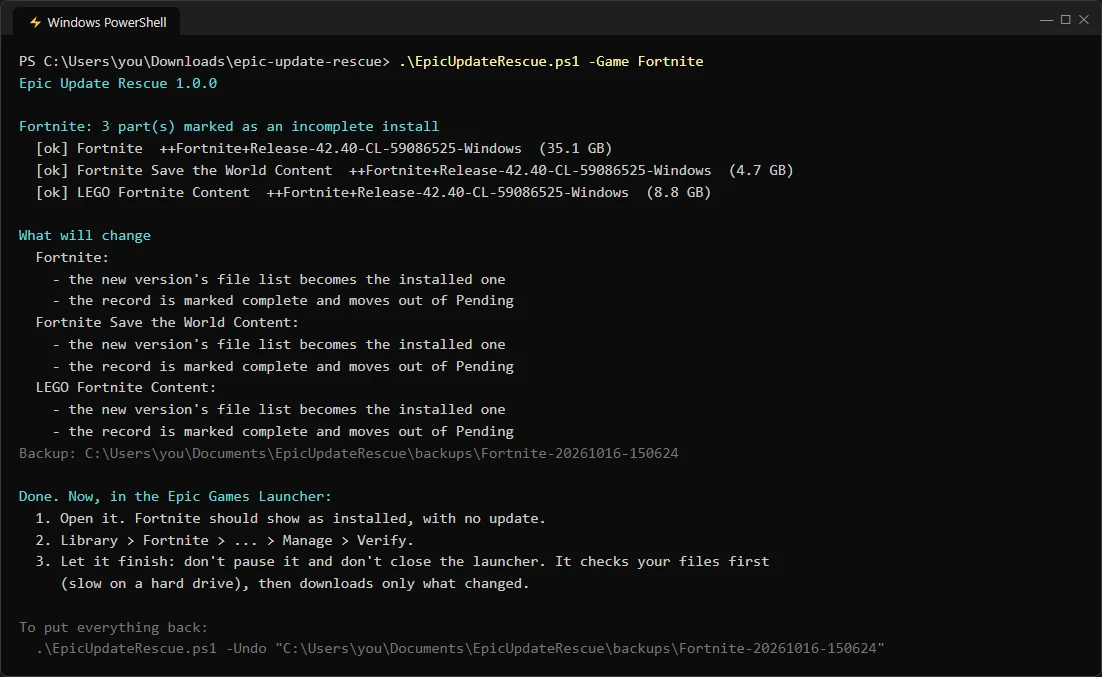
And because I didn’t want to test it on a real launcher, there are 47 automated checks that build a fake launcher setup in a temp folder and run on every push.
“Looks a bit sus”
A friend gave me the most useful feedback of the whole project: “people won’t run a random script from GitHub.” Fair. So I changed the README:
- The manual fix comes first, so you can do it without downloading anything.
- The script is one plain-text file you can read in Notepad.
- Releases come with SHA-256 fingerprints and a VirusTotal scan (0 of 66 engines flag it).
Trust turned out to be a feature too.
Avoiding it next time
Don’t pause or close the launcher during an update. If it’s slowing your PC down, use Settings → Throttle downloads instead.
The tool is free and open source on GitHub. It’s not affiliated with Epic Games. It only edits the launcher’s own files on your PC, and everything can be undone.